Silent Cat Pattern Wired USB Mouse with Color Backlight
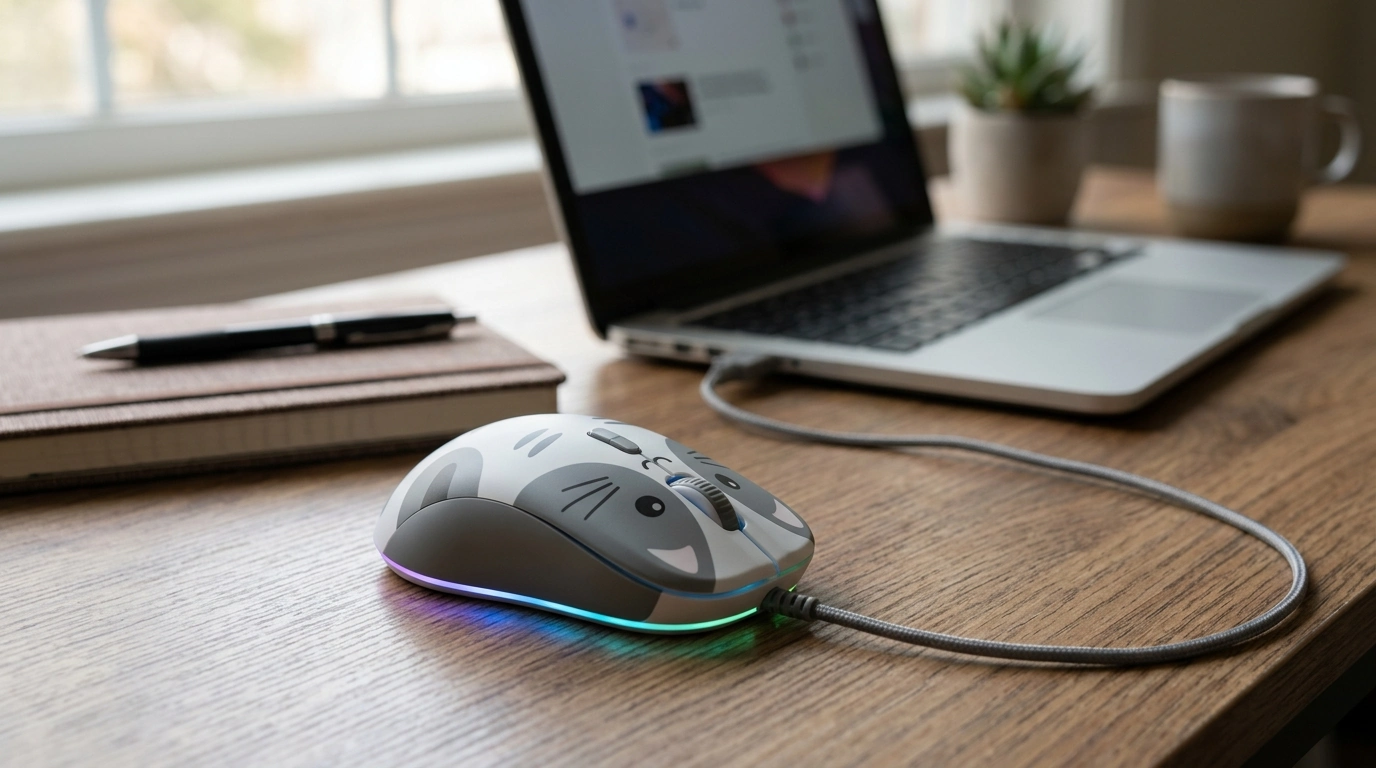
Cat Pattern Colorful Backlight Wired Mouse Silent USB for Samsung
Add a little personality to a desk setup without giving up everyday practicality. This wired USB mouse pairs a playful cat pattern and colorful backlighting with quieter clicks, making it a solid pick for study sessions, office work, and late-night browsing on compatible Samsung devices. If a dependable connection matters more than battery levels—and a cute, colorful look is a bonus—this mouse fits right in.
What makes this mouse stand out
- Cat pattern design that adds character to home, dorm, or office setups
- Colorful backlight for a more visible, lively desk environment
- Silent-click style feel designed to reduce click noise in shared spaces
- Wired USB connection for consistent power and stable use without charging
For shoppers who want something more fun than a plain black mouse, the combination of themed styling and backlighting offers a simple way to make a workstation feel more personal—without changing how you work day to day.
Design and comfort for daily use
A mouse can look great but still feel “off” if the size doesn’t match the way you hold it. This one keeps a compact, easy-to-carry footprint that works well for laptop bags, smaller desks, and on-the-go routines like moving between classes or working in different rooms.
- Compact form factor suits laptops and tighter spaces while staying easy to pack
- Cat-themed styling makes it a gift-friendly accessory for students, coworkers, and themed desk setups
- Wired connection helps avoid wireless dropouts and eliminates battery management
- Comfort tip: best results come from matching mouse size to hand size and grip style (palm, claw, or fingertip)
If your hand runs larger or you prefer a full palm grip, consider how long you’ll use the mouse each day. For shorter work sessions, compact mice are usually comfortable; for all-day use, choosing a shape that supports your grip can reduce fatigue.
Colorful backlight: when it helps (and when it doesn’t)
Backlighting is partly about style, but it can also be practical. In dim rooms—like late-night study sessions or bedrooms shared with others—desk lighting that doesn’t require turning on bright overhead lights can feel more comfortable.
- Visibility boost: backlighting can make the mouse easier to locate and add ambiance to a workstation
- Always-on while plugged in: because it’s powered by USB, lighting runs as long as the mouse is connected
- If you’re distraction-sensitive: lowering nearby screen brightness or adjusting desk placement can make lighting feel subtler
- Battery note: when using a laptop unplugged, wired peripherals can slightly affect runtime compared with using no peripherals
Since lighting is powered through the USB port, there’s no separate charging routine—plug it in and it behaves consistently every time.
Silent clicking for shared spaces
In quiet environments, click noise can feel louder than expected—especially during repetitive tasks like selecting text, sorting spreadsheets, or editing photos. A silent-style mouse aims to reduce that sharp click sound, helping you stay productive without drawing attention.
- Great for quiet zones: libraries, open offices, bedrooms, and shared study areas
- Different feel is normal: silent switches often soften the sound, which can slightly change click feedback
- Surface matters: a mousepad can reduce extra noise from movement compared with a bare desk
- Cleaner audio on calls: quieter clicking can help keep background noise down during video meetings or streaming
Pairing a quiet-click mouse with a consistent mousepad is a simple upgrade that can make the whole setup feel smoother and less “clacky.”
Compatibility with Samsung devices
This mouse is designed for standard USB input, which makes it broadly compatible across many Samsung computers. Most operating systems recognize USB HID (Human Interface Device) peripherals automatically, so you can typically plug in and start using it right away.
For more background on USB standards and device behavior, see the USB Implementers Forum (USB-IF). For mobile compatibility and OTG/host mode details, the Android USB host (OTG) overview is a useful reference.
Setup tips and basic troubleshooting
Quick spec snapshot
| Detail | What to expect | Notes |
|---|---|---|
| Connection | Wired USB | No charging required; stable connection |
| Click sound | Silent-style clicking | Designed to reduce audible clicking in quiet spaces |
| Lighting | Colorful backlight | Runs while plugged in |
| Device fit | Samsung computers and other USB-compatible devices | Tablets/phones may need OTG + adapter |
| Style | Cat pattern design | Popular for themed desks and gifting |
Who it’s best for
If that sounds like your setup, the Cat Pattern Colorful Backlight Wired Mouse Silent USB for Samsung is an easy, low-maintenance upgrade: plug in, enjoy stable control, and keep the room a little quieter.
More in-stock picks you may like
- Waste Wise: A Home Recycling Guide | Simple Home Waste Sorting System, Eco-Friendly Living Guide & Digital Download
- No-Stress Packing Checklist for Traveling With Kids – Ultimate Family Travel Guide & Digital Download
- EA7 Women’s Leather Sneakers
FAQ
Will this work with a Samsung tablet or phone?
It can if the device supports USB OTG and you have the correct adapter (USB-C or Micro-USB to USB-A). Otherwise, it’s best paired with Samsung laptops or desktops that have standard USB ports.
Is the click completely silent?
It’s designed to be quieter than a standard mouse, reducing the sharp clicking sound. Noise level can still vary based on switch feel, surface type, and how firmly the buttons are pressed.
Does it need drivers to install?
Most systems detect USB HID mice automatically, so no extra drivers are typically needed. If it isn’t recognized, switching USB ports or restarting the device usually resolves it.









Leave a comment